We know that people’s time is limited these days, which is why Magnolia Shores Dental is happy to offer teledentistry! Now, you can talk with a dental professional and have your mouth examined via your phone or laptop in the comfort of your home. To make this consultation as effective as possible, be sure to follow the guidelines below, and if you have any questions, don’t hesitate to contact us.
Step 1
Take 3 Photos of Your Mouth
Of course, we need to be able to get a good look at your teeth, and a few basic photos will help us do exactly that! Prior to taking them, be sure to brush your teeth and find a place with plenty of light. The pictures have to be clear and in focus. Once you’re ready, please take pictures using the following angles…
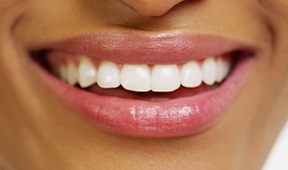
Front of Mouth
Basically, you just need to smile like you would for a normal photo, except the camera will be very close to your teeth like the example above. Ideally, your smile should be at the center of the image, and the surfaces of your front and lower teeth should be easily visible.
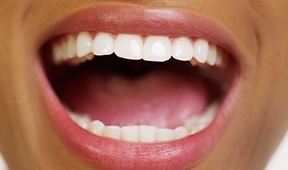
Open Mouth Up
Open wide! This will allow us to see the contour of your upper teeth. Try to make your mouth as wide as possible (without causing any pain) and take the picture from a low angle.
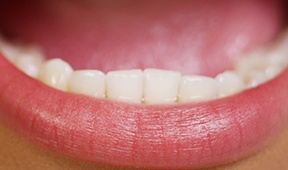
Open Mouth Down
This picture will basically be the polar opposite of the one you just took. Keep your mouth open, but shoot from above so we can see how your lower teeth are oriented.
Step 2
Describe Your Dental Concerns
Does one of your teeth hurt? Are you interested in whitening treatment? Do you have missing teeth and want to know more about your replacement options? Tell us about your goals in as much detail as possible, and we’ll use your input to formulate our treatment suggestions.
Step 3
Email Dr. Tristan J. Parry, DDS
After you have taken the 3 photos and checked them one last time to ensure they’re clear and focused, just attach them separately to an email. Tell us about your concerns and goals, like we outlined above in the same email, and send it all to tristanparry@msn.com. Dr. Parry will take a look at your images and send you a personalized response. From there, he’ll let you know what to do next, whether this involves coming to our dental office in person or not.
We’re happy to offer this convenient option for you, and we hope it’s the first step toward the healthy and beautiful smile you deserve!